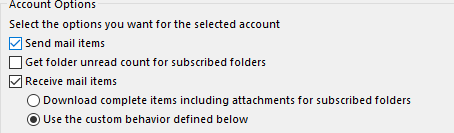
If you’re receiving send/receive errors in Outlook when you try to send an email from your Gmail account you need to define the Send/Receive Groups.
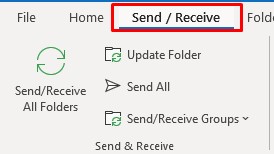
- Select Send/Receive from the top menu
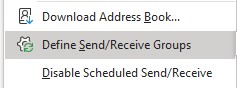
- Dropdown Send/Receive Groups and select Define Send/Receive Groups
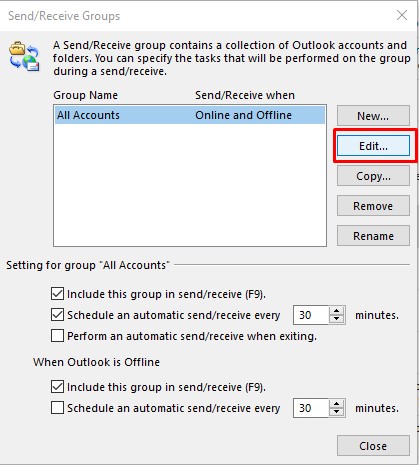
- Click on Edit
- Uncheck ‘Get folder unread count for subscribed folders’
- Select ‘Use the custom behaviour defined below’ for Recieve mail items (make sure only the Inbox is ticked)
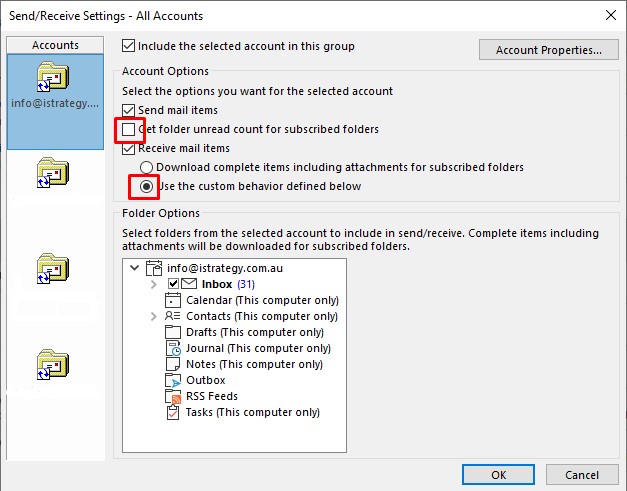
You will now be able to send emails from Outlook when using your Gmail IMAP connection. The send/receive task will finish in a reasonable time instead of taking forever and generating errors in Outlook.
We hope you enjoyed this IT support solution for Microsoft Outlook and Gmail.
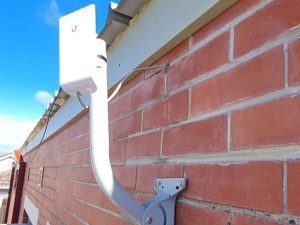
Ubiquiti NanoStation Upgrade Mordialloc | airMAX Wireless
When the outdoor Ubiquiti Loco M2 used in a point-to-point wireless link at U3A Kingston in Mordialloc failed, the site needed the connection restored with a suitable replacement.
We replaced the failed radio with a Ubiquiti NanoStation M5, configured and aligned the new unit, then tested the wireless link onsite.

Weekend Business Wi-Fi, EFTPOS & Network Support in Melbourne
A Brunswick therapy practice needed urgent weekend help with slow Wi-Fi, a misconfigured Deco mesh system, EFTPOS connectivity and website access issues. We simplified the network, restored reliable coverage and isolated a separate Aussie Broadband DNS issue.
Facebook Account Hacked? How We Helped a Bentleigh East Client Secure Their Accounts
A client in Bentleigh East contacted us after becoming concerned that their Facebook account and primary Mac computer may have been compromised.
They had noticed that their profile picture had changed unexpectedly, along with inflammatory Facebook comments being posted to other people from their account. Understandably, they wanted to know whether someone had gained access to their Mac, Facebook profile or other important online accounts.
WordPress Website Security Checklist for Small Businesses
A practical WordPress website security checklist for small businesses, covering plugin updates, backups, MFA, admin access, hosting, DNS, email security and incident response. Learn how to reduce the risk of your website being hacked, blacklisted, defaced or used to send spam.

UniFi Wi-Fi Speed & Drop-Out Issues in a Large Kew East Home
We were recently called out to a large home in Kew East where the client was experiencing slow Wi-Fi speeds, drop-outs and inconsistent performance across the house.
The home already had a fairly serious network setup installed, including four UniFi access points connected back to an enterprise 16-port Ubiquiti Edge PoE+ switch. The internet connection was with Aussie Broadband, and the main router being used was an Eero router.
On paper, the home had the right idea: multiple access points, wired backhaul and business-grade networking equipment. But the way the Wi-Fi was configured was causing problems.