Virus & Malware Removal Melbourne
Help removing viruses, malware, unwanted software, browser hijackers and suspicious programs from Windows PCs and Macs.
We can clean up the device, investigate what changed and help reduce the chance of the problem returning.
25+ years
Local technicians
7-day support
260+ reviews
On-site & remote
Not sure if your computer is clean or your accounts are still secure?
Talk through suspicious pop-ups, malware warnings, unusual computer behaviour or a recent scam with a Melbourne IT technician. We can help determine whether the computer needs malware removal, account-security work or broader cyber-security support.
✓ 15-minute phone review
✓ No remote access required
✓ No obligation
✓ Practical next steps
Start with a quick Virus & Malware Review
Tell us what happened and what the computer is doing so we can recommend the safest next step.
Prefer to talk? Call 1300 694 877
Virus & Malware Removal Melbourne
We focus on removing the immediate problem, checking for unwanted changes and helping secure the computer afterwards.
Remove the Threat
Identify and remove common malware, adware, potentially unwanted programs and suspicious software.
Repair the Damage
Clean up browser settings, startup items, unwanted extensions and other changes left behind by the infection.
Reduce Repeat Infections
Update the device and review practical security controls after cleanup.
Trustworthy & Reliable
Experienced technicians focused on practical solutions, clear advice and long-term client relationships.
Available On Demand
Support when your business needs it, without needing to maintain a full in-house IT department.
Dedicated IT Experts
Work with experienced technicians who can get to know your devices, systems and business requirements.
Virus & Malware Removal Services
Support for common malware and unwanted-software problems affecting home users and Melbourne businesses.
Virus & Malware Cleanup
Scan for and remove common malicious or unwanted software affecting the computer.
Browser Hijacker Removal
Remove unwanted browser extensions, redirects, changed search settings and persistent browser behaviour.
Scam Pop-Up Cleanup
Remove persistent fake security alerts and help identify whether additional unwanted software was installed.
Windows Malware Removal
Clean up suspicious software, unwanted startup items and malware-related changes on Windows PCs.
Mac Adware & Browser Cleanup
Assess common Mac adware, unwanted browser changes, extensions and suspicious applications.
Post-Infection Security
Review updates, endpoint protection and practical steps to reduce the likelihood of reinfection.
Rated 5 Stars by Melbourne Customers
260+ customer reviews for IT support, computer repairs, Microsoft 365 and networking assistance.
EXCELLENT
Based on 260 reviews
-
GDGeorge Dalidakis★★★★★
I am always happy with your efficient and prompt assistance when I need you!!
-
ncnello compagnino★★★★★
Absolutely recommend Michael he is a SUPERSTAR he is a true professional Love his work ethic and he has set my system up perfectly 👌
-
SKSteven Kruger★★★★★
I found Michael to be very knowledgeable and helpful in my quest to upgrade my desk top computer which he had upgraded approximately 1 year ago. His pricing is competitive and product knowledge professional. Thank you.
-
STStephen Tingay★★★★★
Amazing support 24/7. When you don’t have tech knowledge Michaels ability to help at any time is 2nd to none 👍💯‼️
-
GGCA★★★★★
I've had lots of fantastic experiences with Intuitive Strategy. They are reliable, highly efficient, and always a pleasure to deal with. What really stands out is how quickly they respond whenever I need assistance. It's reassuring to know that if a problem arises, they're onto it straight away and get things resolved with minimal fuss. I highly recommend Intuitive Strategy to anyone looking for responsive and dependable IT support.
-
J-Judy - LVL Group★★★★★
amazing work fix my computer problem so quick . great service !!
-
TWTremlett Woodstar★★★★★
Friendly, Prompt, knowledgeable, . . . they fixed all our apple and PC problems efficiently and importantly at an affordable price. What else is there to say, we highly recommend Intuitive Strategy for all our computer/IT needs. Toucan Glass Studio
-
DCDavid Cooke★★★★★
In our design practice, we really like working with the team at Intuitive Strategy. Michael & Hugh from the team are always there for us when we need them. Our most recent IT upgrade to M365Email was brilliantly handled by Hugh, who set things up for us out of office hours to make sure we had a seamless transition. Highly recommend this crew
-
ALAlison Lamont★★★★★
Thanks Michael for a wonderful outcome to our tech issues. You were a calm, patient and very competent support.
-
HBHarley Berridge★★★★★
Amazing service and quality technical work. Michael and team saved our bacon on a Sunday. They bent over backwards to fix our laptop and recover project work stuck on a faulty drive. Highly recommended!
-
KZKylie Zamel-Gjubini★★★★★
Hugh supported our business with IT security and email domain set up and migration. Services was quick, knowledgable and took the stress out of us having to understand and manage this process.
-
LKLucia K★★★★★
Fantastic, service as always, problems consistently fixed swifty and completely resolved. Good, prompt, consistent service is a surprise these days.
-
SGSteven Grant★★★★★
Michael was efficient, fast, friendly and extremely helpful in sorting out not only the problem contacted about but willing to spend the time to sort out several other minor issues as well.
-
SASarah Ashton★★★★★
Micheal was patient with me and guided me through a difficult process. Highly recommend
-
OOOptical Oasis★★★★★
We have been using Michael and his team for a number of years and cannot fault the service. Always quick on the response and extremely knowledgeable. As a small business he never makes me wait like other big businesses have in the past. My small business is always important to them.
-
RARobin Alfredson★★★★★
The service was excellent!!
-
PBPaul Burke★★★★★
Michael is very responsive and knowledgeable. Great customer service and great outcomes!
-
SSScott Stephens★★★★★
I would give a 10 star if I could. IT and phones are my worst nightmare when things go wrong !! Hugh is very calm , follows careful process, time efficient ! … and a gentleman with it !! .. I have already passed his details on to friends and family.
-
BPBruce Pattison★★★★★
Excellent service & follow up from Hugh to fix an email issue & help with a new laptop. I highly recommend Hugh.
-
DIDaniel Ingram★★★★★
Hi Dealing with Michael, Hugh and the team has been a seamless experience. Hugh’s expertise and knowledge of products helped make the situation smoother. Very professional and friendly service. This Team can work through any situation. 5 stars from me & as much work as I give them Well done 😃
Windows Virus & Malware Removal
Windows computers can be affected by malicious software, unwanted programs, browser extensions and fake security tools that alter the way the computer behaves.
We can investigate symptoms including:
- persistent security or scam pop-ups
- unknown programs appearing unexpectedly
- browser redirects or changed search settings
- unwanted extensions and toolbars
- suspicious startup programs
- security software being disabled or replaced
Once the immediate problem is removed, we can update the system and review endpoint protection and other basic security settings.
Browser Hijackers, Scam Pop-Ups & Phishing
Not every alarming message on a computer is a real virus warning. Fake browser alerts are commonly designed to frighten users into calling a phone number, installing unwanted software or providing account details.
We can help with:
- persistent browser security warnings
- fake antivirus or Microsoft support pop-ups
- unwanted redirects and search changes
- suspicious browser extensions
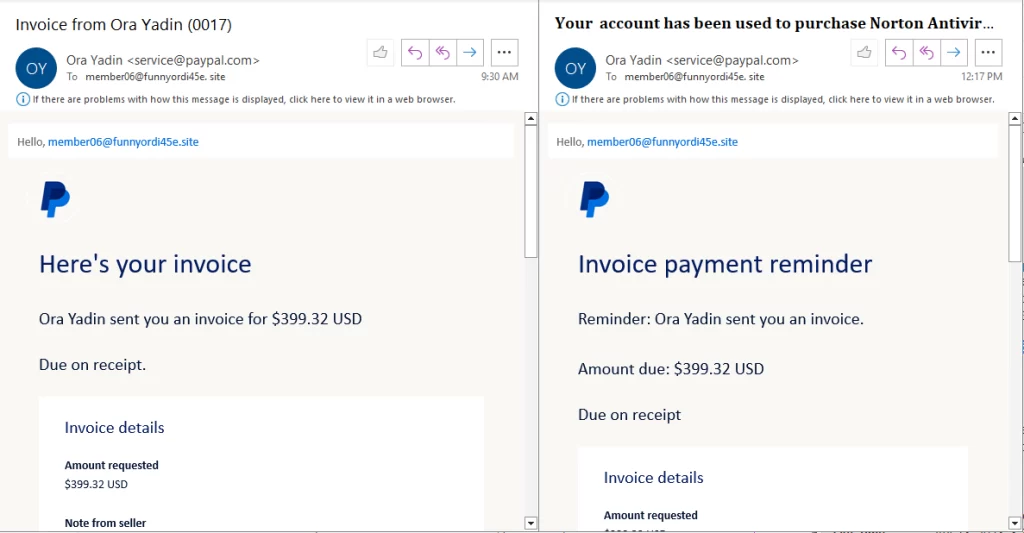
- malicious email attachments and downloaded files
- checking whether further cleanup or account-security work is required
If you have already entered passwords or payment information into a suspicious site, tell us so we can include account-security steps in the response.
Business Malware Response & Endpoint Protection
For a business computer, malware removal should not stop at deleting the obvious infection.
We can also review whether the incident may have affected business accounts, shared data or other endpoints and help improve the device protection afterwards.
Depending on the situation this may include:
- endpoint malware cleanup
- security and Windows updates
- endpoint protection review
- checking suspicious software and startup items
- password and account-security recommendations
- escalation into our broader cyber-security service where the incident affects the business beyond one computer
For ongoing MDR, Microsoft 365 security and Essential Eight work, see our Cyber Security Melbourne service.
Malware Support for Melbourne Businesses
Malware on one workstation can interrupt access to email, files and business systems. We support small businesses across a range of professional and operational environments.
Accounting & Finance
Legal
Dental & Healthcare
Professional Services
Education & ELC
Trades & Operations
After Malware Removal: Secure the Computer
Removing malware fixes the immediate problem, but it is also worth reviewing how the infection happened and whether anything else needs attention.
After cleanup we may recommend:
- installing outstanding Windows or macOS updates
- updating browsers and commonly targeted applications
- reviewing antivirus or endpoint protection
- removing unnecessary software and browser extensions
- changing passwords where credentials may have been exposed
- enabling MFA on important accounts
- checking that useful backups are available
If there are signs of a wider account compromise, we can also help secure affected accounts and determine whether broader cyber-security remediation is appropriate.
What To Do If You Suspect Malware
A few simple actions can avoid making the situation worse before the computer is assessed.
Do
- take a photo or screenshot of suspicious messages where safe
- disconnect the computer if you suspect an active compromise
- tell us what happened immediately before the problem started
- let us know if passwords or payment information were entered
Avoid
- calling phone numbers shown in browser security pop-ups
- installing unknown “cleaner” or antivirus software from an alert
- continuing to use sensitive accounts if credentials may have been stolen
- assuming the problem is resolved just because the pop-up disappeared
Recent Virus & Malware Removal Services
Recent virus, malware and security cleanup work completed for Melbourne customers.
Virus & Malware Removal
12 Sep 2026 Remote support for malware pop-ups removal from Microsoft Edge in Brighton.
8 Sep 2026 Remote troubleshooting of slow computer: diagnosed Kaspersky Antivirus bad update, SFC scan and DISM update to remove corruption in Bentleigh.
5 Aug 2026 Personal cyber security consultation, computer malware cleanup, configured OneDrive cloud sync and Google Chrome in Malvern.
2 Jul 2026 Removal of malware QR code app from Android phone causing ads to pop up constantly, further check of laptop in Patterson Lakes.
27 May 2026 Malware, pop-ups and scam removal, cyber security service, browser notification hijack in Cheltenham.
Virus, Malware & Security Insights
Practical examples and advice covering malicious attachments, computer security and compromised accounts.
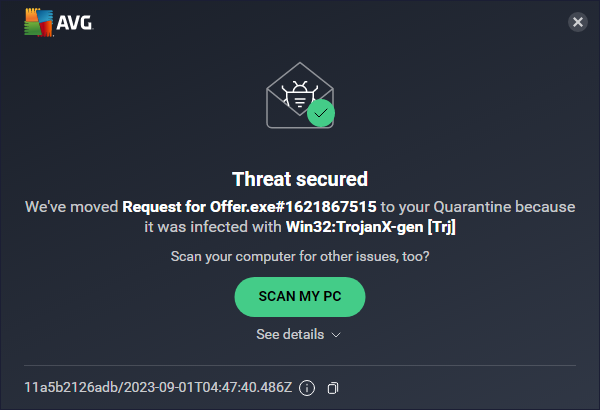
A real malicious email attachment example and what makes executable attachments dangerous.
Practical steps that help reduce the chance of malware, unwanted software and account compromise.
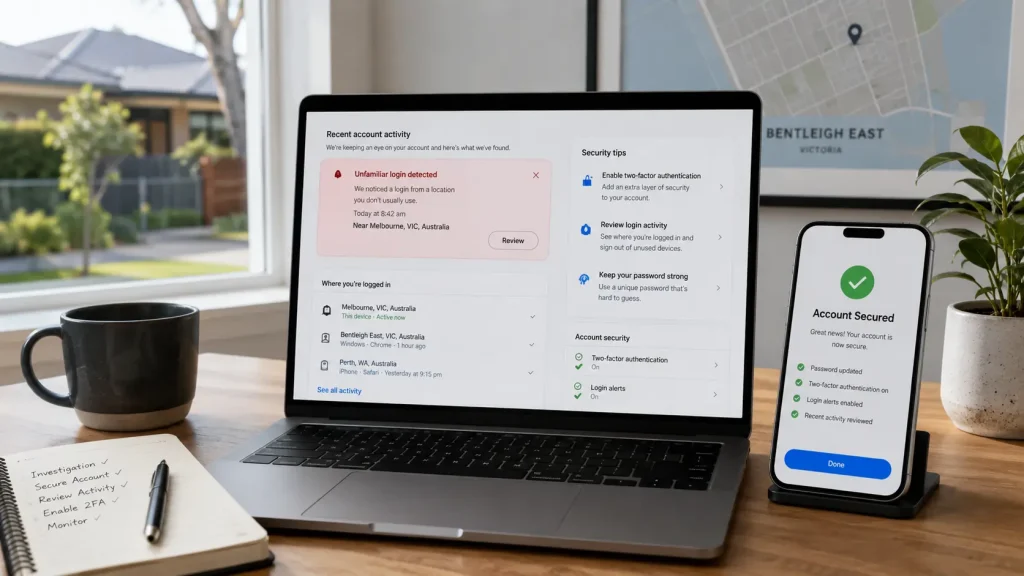
A real Melbourne incident involving compromised accounts and the steps taken to help secure them.
Virus & Malware Removal FAQs
How do I know if my computer has a virus or malware?
Common signs include persistent security pop-ups, unwanted browser redirects, unknown programs, unusual startup behaviour, disabled security software or suspicious extensions. These symptoms do not always prove malware is present, so we assess the computer before deciding what needs to be removed.
Can you remove viruses and malware from Windows computers?
Yes. We can assess Windows computers for common malware, unwanted programs, browser hijackers and suspicious software, remove identified threats and clean up related changes where practical.
Can you remove malware or adware from a Mac?
We can help with common Mac adware, unwanted applications, browser extensions, redirects and suspicious software. We first assess what is actually causing the behaviour rather than assuming every problem is malware.
Can you remove fake virus warnings and browser pop-ups?
Yes. Fake security warnings and scam pop-ups are common. We can remove unwanted browser settings or software causing persistent alerts and check whether anything else was installed on the computer.
What should I do if I clicked a suspicious email attachment?
Stop opening the attachment, avoid entering passwords or sensitive information and contact us with what happened. If the file may have executed, we can assess the computer and determine whether account-security steps are also required.
What if I entered my password into a suspicious website?
Tell us which account was involved. Password changes, MFA, account-session review and other security steps may be more important than malware removal alone. We can help determine the appropriate response.
Can you recover files encrypted by ransomware?
We do not promise ransomware decryption or specialist data recovery. We can help assess the affected computer, contain the incident, check available backups and determine whether broader cyber-security or specialist recovery assistance is required.
How can I reduce the chance of getting infected again?
Keeping Windows or macOS, browsers and applications updated is important. We also recommend reputable endpoint protection, MFA for important accounts, regular backups and avoiding unexpected attachments, downloads and fake security alerts.
Need Help With a Virus, Malware or Suspicious Computer?
Tell us what the computer is doing, when the problem started and whether any passwords or payment information may have been exposed.